Celsius to Fahrenheit Convert
WebtowebWeather
4.2560.00 Reviews
- Version
- 1.4.3
- Installs
- 100.00K
- Age Rating
- Everyone
Screenshots
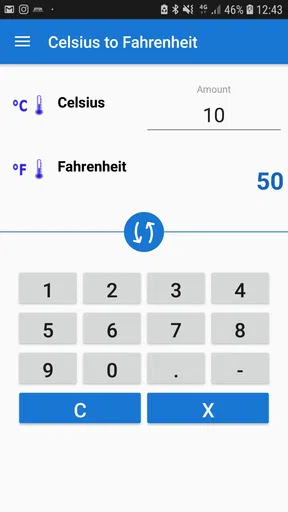
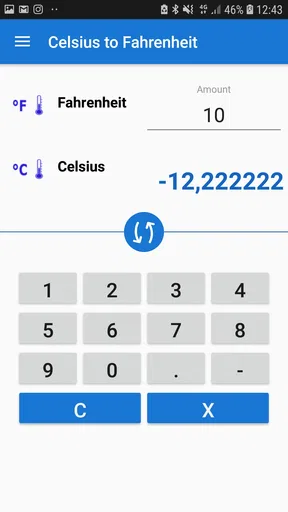
Our Review of Celsius to Fahrenheit Convert
 Analysis by Appyee
I usually keep a weather app open for forecasts, alerts, and radar, but there is a different kind of weather problem that appears in ordinary moments: someone gives a temperature in Celsius, a recipe uses Fahrenheit, or a travel plan suddenly requires switching between the two. Celsius to Fahrenheit Convert, developed by Webtoweb, is built for that narrow job. After using it, I found the appeal easy to understand: it removes mental arithmetic from a small but recurring inconvenience.
This is a free weather utility for Android, rated for Everyone, and it has been available since Apr 20, 2018. The current version is 1.4.3 and it works on Android 7.0 or later. Its average rating is 4.2 from around three thousand ratings, with more than one hundred thousand installs. Those figures suggest a useful niche rather than a universal replacement for a full forecast app, and that distinction matters when deciding whether it deserves a permanent place on your phone.
From quick first impression to lasting usefulness
When I move from that quick first impression to deciding whether a small converter deserves a lasting place on my phone, I start by looking at the habits that bring it back into use. The useful question is not how often I open it in a week, but whether it reliably removes a pause from cooking, travel planning, or conversations across temperature scales. That makes the app’s ongoing value easier to judge than its novelty.
The first-week appeal is immediate and practical
The strongest part of this app is how quickly its purpose becomes clear. You do not need to learn a weather dashboard or interpret a long forecast. You enter a temperature in one scale and get the equivalent in the other. That directness makes it suitable for a first-time user who simply wants an answer without remembering the conversion formula.
In my first week with it, I found the most useful situations were the small interruptions that normally lead to a web search. A friend might mention that it is twenty degrees outside, and I may instinctively wonder whether that means light-jacket weather or something much colder. A cooking video may use Fahrenheit while my kitchen habits are based on Celsius. A message from a relative abroad may include a temperature that needs translating before I can picture the conditions. For all of these, a dedicated converter is faster than opening a browser and sorting through unrelated results.
The app’s narrow focus is also its main advantage over a conventional weather service. A forecast app tells me what the weather is expected to be in a location, but it may not help when I already have a temperature and only need the other scale. Searching online can work, yet it introduces extra steps and often presents a formula, an explanation, or a conversion table when I only want the result. This tool feels more appropriate for that single action.
One useful habit is to treat it as a translation tool rather than a weather source. If a thermometer, news report, recipe, or travel notice gives me a temperature, I can use the app to interpret it. That prevents a common mistake: assuming that a converter knows the current conditions. It does not need to fetch a forecast to be valuable, but I should still use a dedicated weather service when I need rain timing, wind, warnings, or location-based predictions.
Small workflows make the simple tool more useful
A less obvious benefit is that conversion can be part of a larger decision instead of an isolated calculation. Before packing for a trip, I can translate several temperatures from a destination’s forecast and compare them with the clothing I normally use at home. When checking an international recipe, I can convert the oven temperature or ingredient-related guidance before starting, rather than stopping halfway through preparation. When reading a health or fitness discussion from another country, translating the stated temperature helps me understand the context without guessing.
There is also value in using the app as a quick verification step. I may know that Fahrenheit and Celsius move differently, but mental estimates can become unreliable around freezing or in unusually hot weather. Entering the number gives me a more dependable reference than trying to calculate while distracted. This is especially helpful when the result affects a practical choice, such as whether outdoor equipment needs protection or whether a room feels unusually warm.
The conversion formula itself is simple, but simplicity is not always the same as convenience. Celsius to Fahrenheit requires multiplying by nine-fifths and then adding thirty-two; the reverse requires subtracting thirty-two and multiplying by five-ninths. That is manageable on paper, but the app saves time and reduces the chance of dropping a step. Its usefulness comes from removing friction, not from offering a complicated feature set.
For families, the Everyone content rating is reassuring because the task is harmless and easy to explain. A child learning about temperature scales can use it alongside a science lesson, while an older relative who does not want to memorize formulas can use it for everyday reading. I would still encourage learners to understand the relationship between the scales, but the app works well as a practical check while they build confidence.
What changes after the novelty fades
The first-week experience is likely to feel more impressive than the long-term one because the app solves a problem immediately. After that, its value depends on how often temperature conversion appears in my routine. If I rarely read international recipes, travel forecasts, or foreign weather reports, I may stop opening it. That is not a flaw in the calculation; it is the natural limit of a single-purpose utility.
For me, the lasting case is strongest when the phone is used across regions or languages. People who regularly communicate with friends abroad, follow overseas media, cook from international sources, or work with temperature-based instructions can encounter enough conversions to justify keeping a dedicated tool. Someone who almost always uses one measurement system may find that the app becomes an occasional download rather than a daily companion.
This is where it compares differently with the usual alternatives. A calculator can handle the formula, but I have to remember the operation and enter it correctly. A search engine can provide a result, but it may require typing a full question and waiting through extra information. A general weather app may display temperatures in the preferred unit, but it is designed around locations and forecasts, not arbitrary numbers supplied by another person. This converter sits between those options: more focused than a calculator, less cluttered than search, and more flexible than a location-based forecast.
The trade-off is that it does not replace those alternatives. If I need a graph of changing temperatures, severe-weather warnings, hourly conditions, or automatic unit preferences across a complete forecast, I should use a broader weather application. If I only need one calculation and already have a calculator open, installing a dedicated converter may be unnecessary. The right choice depends on whether repeated convenience matters more than keeping the app list minimal.
Maintenance is light, but attention still matters
A utility like this should not demand much maintenance, and that is one of its strongest long-term qualities. There is no forecast data to interpret, no location list to manage, and no recurring routine that requires constant adjustment. I can open it when needed, perform the conversion, and leave. That low maintenance burden makes it easier to keep than an app that expects daily interaction.
The current version is 1.4.3, and the Android requirement of 7.0 or later keeps it accessible on older compatible phones. For someone using an aging device, that matters more than having a modern-looking feature list. A small converter does not need to consume attention with regular setup, so compatibility and dependable access are more important than novelty.
There is one financial detail worth noticing. The app is free to use, while in-app purchases are listed at $2.99 per item. That means I can try the basic experience without paying upfront, but I would still check what any optional purchase changes before committing. For a simple conversion task, the free entry point is sensible; the value of an extra purchase would depend entirely on whether it removes a particular irritation or adds something I genuinely use.
Maintenance also includes knowing when not to rely on it. A converted number is only as useful as the number I enter. If a forecast is outdated, a thermometer is inaccurate, or a recipe uses a different temperature context, the app cannot correct the source. I should copy the figure carefully, pay attention to whether it refers to air, oven, water, or another material, and avoid treating a mathematical answer as a complete recommendation.
A practical routine is to use the app for translation, then return to the original source for meaning. For example, I can convert a destination’s forecast temperature, but I should still check wind and rain before choosing clothing. I can convert a recipe temperature, but I should follow the recipe’s cooking instructions rather than assuming every oven behaves identically. This two-step workflow keeps the tool useful without asking it to do a job it was not designed for.
Where repeated use can become tiring
The main source of fatigue is repetition. If I am converting a long list of values, a dedicated app may feel slower than a calculator, spreadsheet, or written conversion chart. The tool is well suited to occasional individual checks, but bulk work can expose the limits of a focused interface. A student, engineer, or professional handling many measurements may prefer a more flexible calculation tool.
Another possible frustration is context switching. When I am already reading a forecast or recipe, leaving that app, opening the converter, entering the number, and returning to the original task can feel like too much effort for a single value. In those moments, a built-in unit setting or calculator may be more convenient. The dedicated app earns its place when the conversion need happens often enough to outweigh those extra taps.
There is also a mental fatigue issue around approximate values. People often use rounded temperatures in conversation, while technical instructions may require precision. The app can convert whatever number I provide, but it cannot tell me whether the original value was rounded or whether a decimal matters. I should avoid presenting a converted result with false confidence when the source itself was only an estimate.
The narrow design can be refreshing, but it may feel bare to users expecting a complete weather experience. There is no reason to open it simply to browse conditions, plan a day, or monitor a storm. Its category is weather-related, yet its job is mathematical rather than predictive. That difference should be clear before downloading it, because confusing the two would lead to disappointment.
Who should keep it and who should skip it
I would recommend keeping this app if temperature conversion appears in ordinary life at least occasionally and I value a dedicated, uncomplicated answer. International travelers, bilingual households, home cooks using recipes from different countries, students, and people who regularly read overseas weather information are the clearest audience. The app is also a reasonable choice for anyone who dislikes memorizing formulas or repeatedly searching the web for a quick result.
I would skip it if I almost never encounter both Celsius and Fahrenheit, or if my existing calculator already handles the conversion comfortably. I would also choose a broader weather app instead when my real need is forecasting rather than translating. The distinction is important: this tool can explain a temperature I already have, but it is not a substitute for information about what the weather will do next.
For someone deciding whether to install it, I would suggest a simple test. Think about the last few times you encountered an unfamiliar temperature. If those moments involved travel, cooking, family conversations, or online content and caused you to pause, a dedicated converter may remove a recurring annoyance. If you cannot remember the last time it happened, the app may remain unused after the initial curiosity fades.
My long-term verdict
After the novelty wears off, Celsius to Fahrenheit Convert remains useful only because it stays focused. It does not try to become a forecast platform, a learning course, or a general calculator. That restraint is valuable when I need one clear answer, although it also limits how often I will open it. The experience is best understood as a small tool that earns space through repeated convenience rather than constant engagement.
Webtoweb has produced something practical for a specific gap between weather information and everyday decision-making. The free starting point, Everyone rating, broad Android compatibility, and straightforward purpose make it easy to try. The average rating of 4.2 and its audience of over one hundred thousand installs indicate that the idea has found a real user base, though popularity does not change the app’s narrow scope.
My recommendation is conditional but positive: keep it if you regularly move between temperature systems, and skip it if your phone already solves that rare task without effort. I would not call it essential for every Android user, but for the right routine it can become one of those quiet utilities I appreciate precisely because it removes a tiny obstacle whenever it appears.
In the end, the app earns lasting space not through constant updates or a large feature list, but through low maintenance and dependable relevance. When I need to translate a temperature quickly, it is more direct than searching and less demanding than doing the formula manually. That is a modest promise, but it is also an honest one—and in a utility this focused, meeting that promise is enough.
Verdict
Strengths of Celsius to Fahrenheit Convert
- Converts Celsius and Fahrenheit quickly with minimal input.
- Clean interface makes temperature conversions easy to understand.
- Useful for cooking, travel, weather, and science-related calculations.
- Provides instant results without requiring manual formulas.
- Lightweight app that should use very little device storage.
Limitations of Celsius to Fahrenheit Convert
- May offer fewer temperature scales than more advanced converter apps.
- Accuracy depends on entering the correct decimal value.
- Basic design may feel too limited for users wanting extra tools.
- Could be unnecessary if your phone already includes a calculator.
- Advertising may interrupt use, depending on the app version.
Similar Picks in This Category
View All
Weather - By Xiaomi
Xiaomi Inc.4.1

Weather & Radar Forecast
WetterOnline4.8

Weather
OneLouder Apps4.6

AccuWeather: Weather Radar
AccuWeather3.6

The Weather Channel - Radar
The Weather Channel4.6

1Weather Forecasts & Radar
OneLouder Apps4.3
Frequently Asked Questions
What does Celsius to Fahrenheit Convert do?
Celsius to Fahrenheit Convert is a simple temperature conversion tool designed to change values between Celsius and Fahrenheit. Enter a temperature in either unit, and the app calculates the equivalent value immediately. It is useful for checking weather forecasts, cooking temperatures, travel information, schoolwork, science exercises, and everyday situations where two different temperature scales are used.
How do I convert a temperature with the app?
To use the converter, select or enter the temperature you want to calculate, choose Celsius or Fahrenheit as the starting unit, and then select the unit you need as the result. The app displays the converted value without requiring manual calculations. For reference, the conversion formulas are Fahrenheit = Celsius × 9/5 + 32 and Celsius = (Fahrenheit − 32) × 5/9.
Does Celsius to Fahrenheit Convert work offline?
Temperature conversion does not normally require an internet connection because the calculations are performed directly on the device. This makes the app convenient when traveling, studying, cooking, or checking temperatures in places with limited connectivity. However, features such as advertisements, updates, support pages, or other online services may still require internet access depending on the app version.
Are the conversion results accurate?
The app uses standard mathematical formulas to convert between Celsius and Fahrenheit, so the results should be accurate for normal daily and educational use. Depending on the selected display settings, decimal values may be rounded to make them easier to read. If you need laboratory-level precision, check how many decimal places are shown and avoid treating a rounded result as an exact measurement.
Is Celsius to Fahrenheit Convert suitable for students and professionals?
The app is suitable for students, travelers, home cooks, teachers, and anyone who regularly works with temperature scales. Its straightforward interface can help users verify homework calculations or quickly interpret international weather and recipe instructions. Professionals who require certified measurements should remember that the app only performs unit conversion; it does not measure temperature or replace calibrated scientific equipment.
